Leaderboard
-
Bloody
Users13Points1,013Posts -
Karmuhh
Users3Points6Posts -
Zedricht
Users2Points435Posts -
viirus_iquickz
Users1Points1,815Posts



Popular Content
Showing content with the highest reputation on 11/22/2014 in all areas
-
3 pointsIts only been a few days but it feels like ive been gone forever, if anyone wants to play this weekend just message me or anything, or just join i will be on pretty much all the time! and thanksgiving break is coming up so i will also be on alot then as well.3 points
-
2 points
-
2 points
-
2 points
-
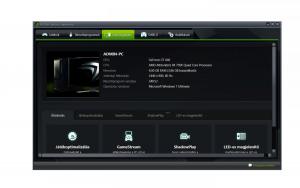
1 pointHey guys:) I have a questions for you:) As some players know nowadays I lagg like a shit..idk why.. Maybe the problem is, How my FPS drops all the time (from 90-100 to 20-30) I bought my pc about 450$ And I think it's so bad thing. There is the type of my pc.
 1 point
-
1 pointThank you guys:) I think I wil re-install my pc and buy 8 GB ram or SSD:) And I used the Razer game booster but didn't helped a lot..I'll try the configs too:) Then, I'll use the 32 bit and not the 64 bit too:)1 point
-
1 pointUse some FPS config, posted one somewhere in the forums, works fine on my shitty laptop, 30 fps. If you get under 60 FPS, do the command com_maxfps 30 to lock it to 30 fps, so you wont feel the jumps between. Or if you have higher, I suggest to maximum lock the FPS on 90, but 60 and 30 is really enough.. Also you can download Razer Game booster, helps with making memory free when playing games, also Geforce Experience got that "Game optimizer" thing that will optimize the config to fit your computer (black ops auto config settings is shit so don't rely on that.) Also, running the game on SSD will help a lot, so that's worth trying if you got that. Overclocking your GPU might also help, Black Ops isn't really using that much CPU so I don't think you'll have to overclock it. Don't overclock if you are really really unsure of what you are doing, as you need to have your fans in the right settings so your CPU or GPU don't burn to death. Also, one last thing, re-install windows, start out fresh. Format your drive so you get rid of shit like virus and stuff if you got any or you had any hidden ones. Re-installing Steam and the game might help, but the whole windows will make it work even better for some. Use that as a last thing. Also 32bit: 4gb MAX Ram 64bit: 16 000 000 000gb MAX Ram You need to have the exact same ram as you currently have if you want to upgrade to more. Or you could just by completely new memories if your current ones are hard to find.1 point
-
1 point
-
1 pointYou're definitely the first person to call me super retarded. I accepted you (who you were) as an individual, and you are probably one of the coolest people I will never forget. Your Canadian accent is so cool, teach me more. From kindergarten to 2nd grade, I didn't really any friends, and I was known as "The Loner." During my summer before I was going to be a 3rd grader, my parents wanted to move because I didn't really have any friends, and plus my neighborhood was really awful (we had people who were trading BAD stuff, people who smoked, people partying, and weird people). I then switched schools, and this new school I got switched to was better than the last one because I made friends easier at this new school than my old school. I currently have a lot of real life friends who I tend to hang out with from time to time. I'm just glad that my parents made the right decision. If I was still where I was today (at my old school with these horrible neighbors), I probably wouldn't have more than 3 friends. Well, there's my life story when I was little. Nice job on 420 posts. Don't forgot to smoke some weed for meh.1 point
-
1 point
-
1 pointAs you maybe noticed my internet is really bad and so it would take very long uploading a high quality video.Sorry but I can't upload a full HD video, I am sure it would take some weeks.1 point
-
0 pointsNo, keep it like it is. Agree with Dewsty, also it's better to know what map is coming and I don't feel like playing random maps all the time.0 points
-
Ohhhh shit, this is a monster. :ph34r: :blink:0 points
-
-1 pointsActually @ViiRuS_iQuicKZ is right about small maps, because then its gonna be more cool to play, if maps are big players can hide like N(.)(.)BS until the map ends.-1 points
-
-1 pointsI love zam I play it almost every day an I love playing sports and yes I do have two pitbulls and they are awesome if u don't like pitbulls fuck u Sent from my iPhone using Tapatalk-1 points
-
-1 pointsThe thing that is causing you the lags is your ram. 4gb is just not good enough for any game really, let alone cods. If you had 8gb ram you would just fine. 4gb ram will just keep dropping your fps when you enter an area that is filled with details and such, that causes the lag because 4b ram cannot handle the pressure from games like even black ops. My suggestion is; Go to your nearest PC shop, get a fresh 8gb ram stick, stick it into your pc and your done. Or full scan your PC, theres viruses that completely slow your pc to shit.-1 points